WhatsApp automation for small businesses: what to automate first
A practical guide to automating customer conversations on WhatsApp: the replies worth automating first, when you need the Business Platform, and how to keep a human in the loop.
Pakistan had about 117 million internet users and 194 million mobile connections in late 2025.[1] For many small businesses, the conversation with those customers happens on WhatsApp. Customers ask for prices, send their location, confirm orders and complain, all in the same chat. When the business grows, the owner’s phone becomes the bottleneck: messages wait for hours, the same questions are answered again and again, and orders get lost between chats.
Automation can help, but only if you automate the right things first. This guide explains where to start, which WhatsApp tools you need, and what should stay with a person.
Start with the questions you answer every day
Open your chats from the last two weeks and count the questions that repeat. For most businesses the same handful come up constantly:
- What is the price of this item or service?
- Where are you located and what are your timings?
- Do you deliver to my area, and how long does it take?
- Is this item available in another size or colour?
- What is the status of my order?
These are your first automation candidates. They have clear answers, they do not need judgement, and answering them instantly makes a visible difference to customers.
Five workflows worth automating first
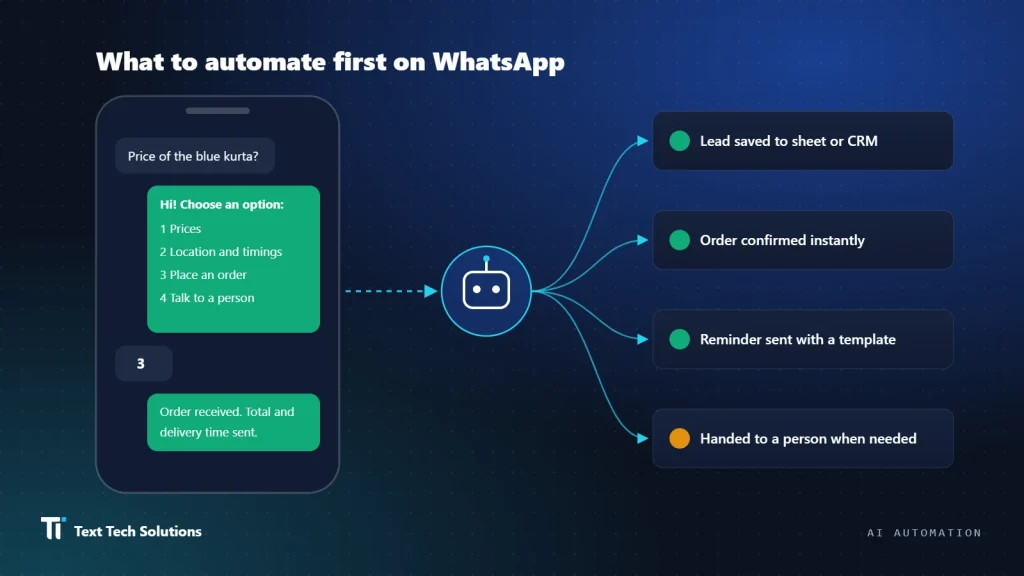
1. Instant first reply with a menu
Greet every new message immediately and offer a short menu: prices, location and timings, place an order, track an order, talk to a person. Even this alone tells the customer they have been heard.
2. Lead capture
When someone asks about a service, collect the basics in the chat: name, city, what they need and a good time to call. Save it to a sheet or CRM so no enquiry depends on someone scrolling back through messages.
3. Order and booking confirmation
Send a confirmation with the order details, total and expected delivery or appointment time. Fewer customers message again to ask whether their order was received.
4. Status updates and reminders
Notify customers when an order is dispatched or when an appointment is tomorrow. Proactive updates reduce the number of where-is-my-order messages.
5. Follow-up after a quote
Many sales are lost simply because nobody followed up. A polite reminder a day or two after sending a quote, with an easy way to reply, recovers conversations that would otherwise go silent.
Business app or Business Platform?
The free WhatsApp Business app already includes automated messaging basics. You can set a greeting message that goes out automatically when a customer writes to you for the first time or after a long gap, and an away message that tells customers when you are unavailable, on a schedule you choose.[3] Add a clear business profile, a catalogue and saved quick replies, and a single owner can handle a modest volume of chats well before paying for anything.
You need the WhatsApp Business Platform (the API) when you want several team members on one number, integration with your website, sheets, CRM or order system, chatbots that handle multi-step conversations, or messages triggered automatically by events such as a new order. The Platform has rules you must design around:[2]
- The customer service window. When a customer messages you, a 24-hour window opens, and each new message from them resets it. Inside the window you can reply freely.
- Templates outside the window. Once the window closes, you can only send message templates that Meta has approved in advance. Reminders and follow-ups usually fall into this category, so write and submit those templates early.
- Opt-in. You may only message people who have agreed to receive messages from your business.
Speak your customers’ language
Customers write in Urdu, Roman Urdu, English, Sindhi and mixtures of all of them, often in the same sentence. A bot that only understands formal English will frustrate people quickly. Keep menus short and clear, accept simple replies such as numbers, and test your bot with real messages from your own chat history rather than imagined ones.
Keep a person in the loop
Automation should make your team faster, not hide them. Always offer a clear way to reach a person, and hand over automatically when:
- the customer is unhappy or reports a problem with an order,
- the question involves money, refunds or exceptions to your policy,
- the bot has misunderstood the customer twice.
When the handover happens, the team member should see the whole conversation, so the customer never has to repeat themselves.
Measure before and after
Before you switch anything on, note a few simple numbers for a typical week: how many chats you receive, how long the first reply takes, and how many enquiries turn into orders. Check the same numbers a month after launch. This tells you honestly whether the automation is helping, and which step to improve next.
A sensible order to work in
- Set up your profile, catalogue, greeting, away messages and quick replies in the Business app.
- List your repeated questions and write clear, short answers for each.
- Automate the first reply, lead capture and order confirmation.
- Write and get approval for templates for reminders and follow-ups, then add them.
- Connect to your sheets, CRM or order system when the volume justifies it.
Text Tech Solutions builds WhatsApp workflows, chatbots and voicebots for small businesses, including support for local languages. If you would like help deciding what to automate first, tell us about your business or see our services.
References
- Kemp, S. Digital 2026: Pakistan. DataReportal (figures for October and December 2025, from Kepios and GSMA Intelligence). datareportal.com/reports/digital-2026-pakistan
- Meta. Send messages: customer service windows and template messages. WhatsApp Business Platform documentation. developers.facebook.com
- How to use auto-reply messages on WhatsApp Business. Business Insider India. businessinsider.in